LapMinAcc
Current Version: 1.0.3
36
Unique Views
2
Free Downloads
0
Donation Downloads
LapMinAcc — Laptop Ministry Accounting System
Version 1.03 A lightweight, self-contained web application for managing laptop donations, inventory, and recipient waitlists for the Laptop Ministry at Peoples Church of Chicago. ---Overview
LapMinAcc tracks the full lifecycle of donated laptops — from intake through refurbishment to distribution — without requiring a database server or external dependencies. All data is stored as flat CSV and JSON files, making it easy to deploy on any shared PHP host. The system serves two audiences:- Public visitors — Submit laptop requests and view fulfillment statistics via the public-facing home page.
- Staff — Manage the waitlist, inventory, and reports through a password-protected admin panel. ---
- Laptop request submission form with hardware preference checkboxes and math captcha
- Donation information panel (drop-off address, hours, contact)
- Live fulfillment statistics and monthly pickup trends
- Inventory status overview (ready units, vintage items, utilization rate)
- Welcome modal for first-time visitors (content editable by staff)
- Add, edit, and delete waitlist entries
- Assign inventory items to recipients
- Track priority status, computer readiness, and pickup dates
- Record hardware preferences and need descriptions
- Search and filter entries
- Log donated computers and parts with donor info and estimated value
- Categorize by type (Computer / Part) and status (Ready / Repair / Parts / Vintage)
- Track tax letter requests for donors
- Mark items as discarded/recycled
- Categorize requests by need (Education, Employment, Housing, Recovery, etc.)
- Date-range filtering for requests and pickups
- Monthly request vs. pickup trend comparison
- Demographic tracking (gender, age range)
- CSV export
- Import: Upload CSV files for waitlist or inventory with column mapping and preview
- Export: Download full waitlist CSV, inventory CSV, or pickup report
- Reconcile: Find and repair orphaned or invalid inventory assignments
- User management with three roles: Admin, Editor, Auditor (read-only)
- Organization settings editor (donation address, contact info, public welcome text)
- Guided setup/reset utility (
setup.php) — self-deletes after use
---
- IP-based login rate limiting (5 attempts → 15-minute lockout)
- Math captcha on public form and login page
- Honeypot field for bot detection on public form
- CSRF token verification on all state-changing forms
- Role-based access control (Admin / Editor / Auditor)
- Output escaping via
htmlspecialchars()throughout - Session ID regeneration on login ---
- Upload all files to your PHP-capable web host.
- Ensure the
data/directory is writable by the web server. - Navigate to
setup.phpin your browser and follow the prompts to create the initial admin account. - Delete
setup.phpfrom the server after setup is complete (the script reminds you). - Log in at
login.php. - Create a file at
data/setup.keycontaining a passphrase of your choice. - Visit
setup.php, enter that passphrase, and follow the prompts. - Delete
setup.phpagain when done.
---
- Attribution — Credit is given to the Laptop Ministry (laptopministry.org) in any derivative work or deployment.
- Share-Alike — Any modified or derivative version is released under these same terms.
Features
Public
Staff — Waitlist
Staff — Inventory
Staff — Reports
Staff — Data Tools
Administration
Tech Stack
| Layer | Technology | |---|---| | Backend | PHP 7.4+ | | Storage | Flat files (CSV + JSON) | | Frontend | HTML5, CSS (Grid / Flexbox), Vanilla JS | | Theme | Custom retro OS/2 Warp-inspired CSS | | Auth | Session-based with bcrypt password hashing | No database engine, no Composer packages, no npm — just PHP and a web server. ---Security
Installation
To reset the admin account later
Data Storage
| File | Contents | |---|---| |data/waitlist.csv | All waitlist entries (15 fields) |
| data/inventory.csv | All donated items (12 fields) |
| data/users.json | Staff accounts (bcrypt-hashed passwords) |
| data/org_settings.json | Public page content and organization info |
| data/login_attempts.json | IP-based rate limit tracking (auto-managed) |
Back up the data/ directory regularly to preserve your records.
---
User Roles
| Role | Waitlist | Inventory | Reports | Import | Export | Reconcile | Users | Settings | |---|---|---|---|---|---|---|---|---| | Admin | Edit | Edit | View | Yes | Yes | Yes | Yes | Yes | | Editor | Edit | Edit | View | Yes | Yes | Yes | No | Yes | | Auditor | View | View | View | No | Yes | No | No | No | ---Project Context
The Laptop Ministry has operated as an official ministry of Peoples Church of Chicago since April 2023. Its mission is to collect donated laptops, securely wipe them, install Linux, and distribute them free of charge to neighbors in need across Chicago. ---License
Released under the Laptop Ministry Open Source Attribution Share-Alike License. You are free to use, modify, and redistribute this software provided that:Download Options
Free Download: Source code and changelog are freely available below.
Compiled Versions: Support development with a donation via PayPal to receive compiled binaries.
Compiled Versions: Support development with a donation via PayPal to receive compiled binaries.
Free Downloads
📦 Download Source CodeChangelog
Changelog — LapMinAcc
All notable changes to the Laptop Ministry Accounting System are documented here. ---[1.03] — 2026-02-26
Added
- Public home page (
index.php) with laptop request submission, fulfillment statistics, and inventory overview - Math captcha on the public request form and the staff login page to block automated submissions
- Honeypot field on the public request form for bot detection
- Welcome modal shown to first-time public visitors; content editable by staff from the dashboard
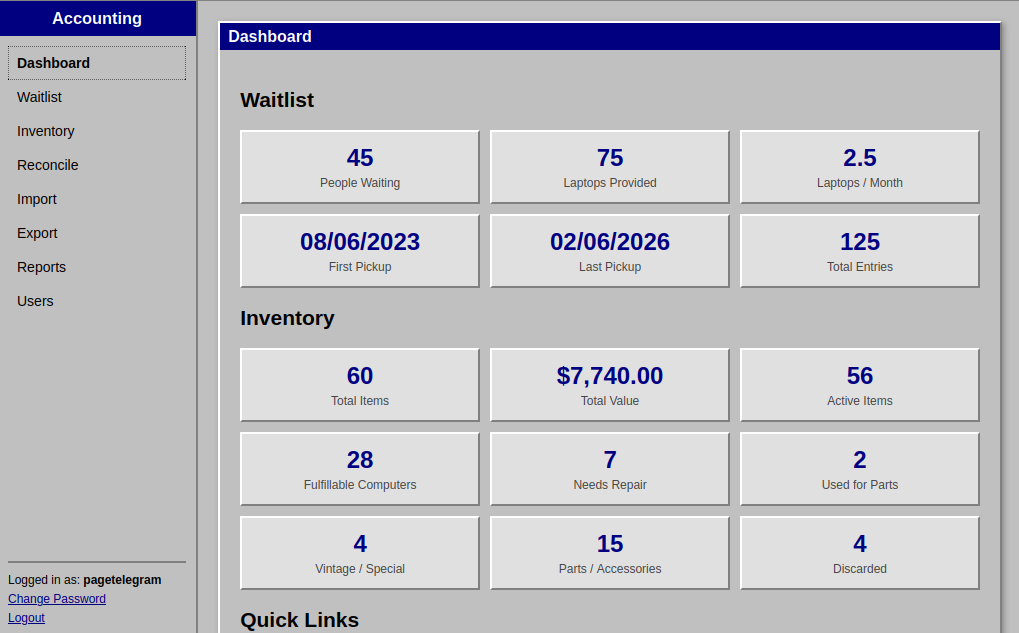
- Dashboard (
dashboard.php) with waitlist and inventory summary metrics and organization settings editor - Waitlist management (
waitlist.php) — add, edit, delete, search, filter, and assign inventory items to recipients - Inventory management (
inventory.php) — log donated computers and parts, track status, donor info, value, and tax letter requests - Reports (
reports.php) — categorize waitlist entries by need type, filter by date range, view monthly trends, and export CSV - Import (
import.php) — upload waitlist or inventory data from CSV with column mapping, preview, and row-level error reporting - Export (
export.php) — download full waitlist CSV, full inventory CSV, or a specialized pickup report with date-difference calculations - Reconcile (
reconcile.php) — detect and repair orphaned inventory references between waitlist and inventory records - User management (
users.php) — create and delete staff accounts with Admin, Editor, or Auditor roles - Profile page (
profile.php) — allow any logged-in user to change their own password - Setup utility (
setup.php) — guided installer for fresh deployments and admin account resets; self-deletes after use - Role-based access control — Admin, Editor, and Auditor roles with appropriate page and action restrictions
- IP-based login rate limiting — 5 failed attempts triggers a 15-minute lockout, tracked in
data/login_attempts.json - CSRF protection on all state-changing forms
- Session ID regeneration on successful login
- Flat-file storage — all data stored in
data/as CSV and JSON; no database required - Retro OS/2 Warp-inspired theme (
assets/os2-theme.css) with beveled windows, navy title bars, and classic gray chrome - Sidebar navigation (
_sidebar.php) with role-aware menu items and active-page highlighting - Organization settings stored in
data/org_settings.json— editable from the dashboard by Editors and Admins - Automatic waitlist numbering with sequential ID assignment on new entries
- 4-character random alphanumeric IDs for inventory items
- File locking (
flock()) on all CSV writes to prevent data corruption under concurrent access